Looking to scale your AI-generated MVP without disrupting users and business operations?
Our team delivers fast AI development along with reliable, enterprise-level architecture.

Published: 24 February, 2026 · 10 mins read
As your AI-generated MVP gains traction and user numbers grow, hidden weaknesses begin to surface across the stack: in the database, memory management, infrastructure limits, and overall application design. Left unaddressed, these issues directly impact user adoption, business viability, and ROI. Read our guide to learn how to strengthen your AI-generated MVP and avoid the most common scaling mistakes.
Today, 64% of businesses say AI is directly enabling their innovation, helping them prototype, test ideas, and ship new features without expanding their teams. While these platforms deliver impressive development speed, our technical assessments expose a critical pattern: applications that perform well with initial users systematically fail when they reach the 10,000-user threshold.
In this article, we’ll examine why AI-generated MVPs consistently fail at this threshold and deliver a framework for prevention
AI-accelerated development delivers genuine advantages. Founders test market hypotheses rapidly, receive user feedback early, and iterate according to actual usage. Some MVPs gain unexpected traction – featured on G2, shared on social media, or discovered through word of mouth.
That’s when the technical foundation starts to crack. Performance degrades gradually. Page loads slow from 200ms to 2 seconds and API responses timeout. Database queries take 5+ seconds. When user counts approach 10,000, these symptoms intensify into operational crises. The database becomes unresponsive. Memory leaks cause crashes. Security vulnerabilities get actively exploited.
The paradox: The faster you validate market demand, the sooner you experience technical limitations.
In our recent in-depth review of AI-generated MVPs, we found that nearly 90% share the same underlying issues. After analyzing dozens of projects, seven recurring mistakes stood out as the main reasons these products struggle to scale.
Standard hosting allocates 512 MB-1 GB memory. AI-generated code includes memory leaks – unclosed connections, cached data that never expires. At 100 users, memory usage is 100 MB. At 10,000 users, you hit limits within hours.
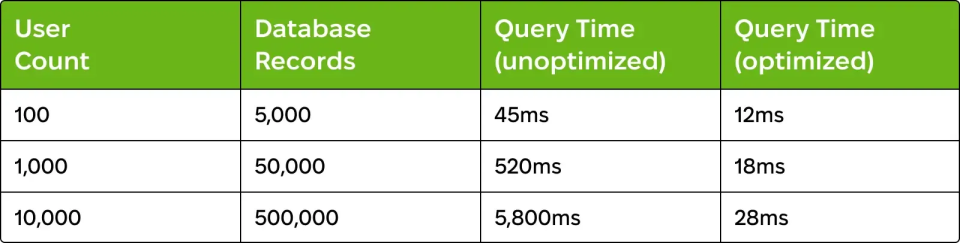
What causes this: AI tools generate queries optimized for development environments having minimal data. These queries lack indexes on foreign keys and on frequently queried columns, resulting in full-table scans. Additionally, N+1 query problems execute hundreds of individual queries instead of proper joins.
Warning signs:
What causes this: AI-generated code creates memory leaks by leaving database connections open, failing to remove event listeners, and retaining objects indefinitely. These accumulate, consuming memory until the application crashes.
Real example: A SaaS application’s memory usage climbed from 200MB at midnight to 800MB by noon, exceeding the 1GB limit by evening, resulting in a complete failure. Investigation revealed unclosed WebSocket connections (45/hour), React intervals without cleanup (200+ after 8 hours), and unbounded caching (100MB+/hour growth).
Warning signs:
What causes this: AI-generated code favours functionality over security. Input validation is minimal. Authentication logic is copied from tutorials. SQL injection, XSS, and authentication bypass vulnerabilities exist throughout.
Real example: A financial planning MVP security assessment revealed 23 SQL injection vulnerabilities, authentication bypass via URL manipulation, exposed API keys ($15,000+ in unauthorized usage), and no rate limiting, enabling credential-stuffing attacks.
What causes this: AI-generated code lacks architectural structure. Business logic is scattered throughout. Components are tightly coupled. Every change creates sequential failures across unrelated functionality.
Real example: A founder wanted to add email notifications for task assignments. This required touching 47 files because the task-creation logic was embedded in 12 UI components, notification preferences were scattered across 8 locations, and email code was duplicated in 15 places. Implementation took 3 weeks and introduced 23 bugs.
Impact on development:

What causes this: Experienced developers assess codebases during interviews. When they encounter the documented issues, they decline offers or demand premium compensation.
Real example: A fintech founder interviewed 12 senior developers. Seven withdrew after code review. Three demanded salaries 40-50% higher. Zero accepted standard terms. The founder approached us for complete refactoring before resuming hiring.
What drives developers away:
Cost of hiring delays:

Our team delivers fast AI development along with reliable, enterprise-level architecture.
Define non-functional requirements explicitly: expected scale, performance targets, security needs, and scalability requirements.
Select architecture patterns matching the expected scale:
We’ve developed a systematic 8-12 week process transforming AI-generated MVPs into production-ready applications:
Investment: $30,000-75,000, depending on complexity – significantly less than rebuilding from scratch ($150,000-300,000) while preserving your user base and momentum.
AI coding tools represent a breakthrough in development velocity. However, speed alone doesn’t ensure success. The 10,000-user threshold marks the point at which architectural assumptions systematically break down.
The five failure points we’ve documented – database collapse, memory leaks, security vulnerabilities, feature paralysis, and hiring difficulties – appear consistently across AI-generated applications. These aren’t random bugs but expected results of how AI tools optimize for immediate functionality rather than long-term scalability.
Success requires recognizing this limitation and implementing systematic quality controls. For founders without deep technical backgrounds, professional expertise delivers value. Proactive modernization (~$30,000-75,000) costs less than reactive rebuilding ($150,000-300,000).
If your AI-generated MVP is approaching 10,000 users – or you want to ensure it can scale before investing in growth – contact Exoft. Our team focuses on transforming rapid prototypes into production-ready platforms.