Not sure where your .NET Framework application stands?
Exoft will assess your system and recommend the right migration path for your unique case.

Published: 22 April, 2026 · 10 mins read
Like any modernization project, migrating from .NET Framework can be a daunting task. But you don’t have to rebuild everything from scratch to switch to .NET. Read Exoft’s guide to discover the three main migration scenarios, what they entail, and how to pick the right one.
It’s not breaking news that .NET Framework has gone legacy. Its last stable release saw the light in August 2022. Yes, Microsoft keeps rolling out security and reliability updates, but .NET Framework is no longer evolving with new features and capabilities.
Yet, you might be stalling with .NET Framework to .NET migration, and we get why. Changing a critical system means substantial risks, so you might be hesitant to modernize it. Downtime, for one, could hurt both your bottom line and your users’ experience.

Source: RedHat, Legacy application modernization challenges organizations face
Legacy .NET application modernization doesn’t always mean tearing down the whole codebase and writing a new one from scratch. Here’s how to pick the right modernization scenario for your system’s architecture, team, and business constraints.
We’ve already mentioned that you shouldn’t expect any new features from .NET Framework. Microsoft has put it into maintenance mode, meaning you’ll get only security and reliability updates for its latest stable release.
But what exactly does that mean for your application and your business? Here are the five consequences of keeping the .NET Framework in place:
Exoft will assess your system and recommend the right migration path for your unique case.
What comes to your mind when you imagine .NET Framework to .NET migration? Rewriting everything in one go? If so, that’s a misconception: most modernizations can be incremental.
That said, choosing the right migration strategy is crucial for mitigating risks. Here’s your .NET Framework migration approach comparison, based on Exoft’s experience.
Upgrading the tech stack means migrating the application to .NET without making any changes to its architecture or business logic. It’s the fastest and most straightforward approach on the list. You probably won’t run into bad surprises along the way, so it’s the most predictable option, too. That said, it doesn’t address the tech debt your application has accumulated.
This path works best for mid-sized applications with a stable architecture, particularly for companies that have an in-house development team capable of executing the migration.
✅ What changes:
❌ What stays intact:
Pro tip from Exoft: Treat this .NET Framework upgrade as the first step in the overall migration. It will help you stabilize the system before addressing the tech debt with replatforming or modularization.2. Incrementally Rewrite
Incremental rewriting involves migrating the system to .NET piece by piece, while the system itself remains live. This is the most common method for .NET Framework migration to .NET. It helps address the underlying technical debt, all while mitigating risks. Besides, the system stays live throughout migration, allowing you to migrate .NET Framework without downtime.
This approach is the go-to method for monolithic applications that require a transition to microservices, business-critical systems that have to be modernized with zero downtime, and legacy systems with complex business logic that are too risky to replace in one go.
For example, when Exoft migrated a two-decades-old gym management platform to a modern .NET tech stack, the incremental approach ensured zero downtime for its millions of users.
Another project where we used incremental modernization is our B2B workforce accommodation platform. It’s a solution that processes large volumes of supplier pricing data and supports employee bookings across multiple markets. We moved smaller services from .NET Framework to .NET Core and .NET 8 step by step, while the platform remained live and continued handling bookings and daily operations. The approach improved scalability and maintainability without the disruption and risk of replacing the entire system at once.
✅ What changes:
❌ What stays intact:
You can use multiple methods for incremental migration. Strangler pattern, for instance, involves layering new functionality on top of the old and routing traffic to those new layers. The old layers are systematically retired.

In turn, vertical slice architecture deals with reorganizing the codebase by capability instead of keeping it structured as technical layers. You can build new capabilities alongside existing ones and run in parallel.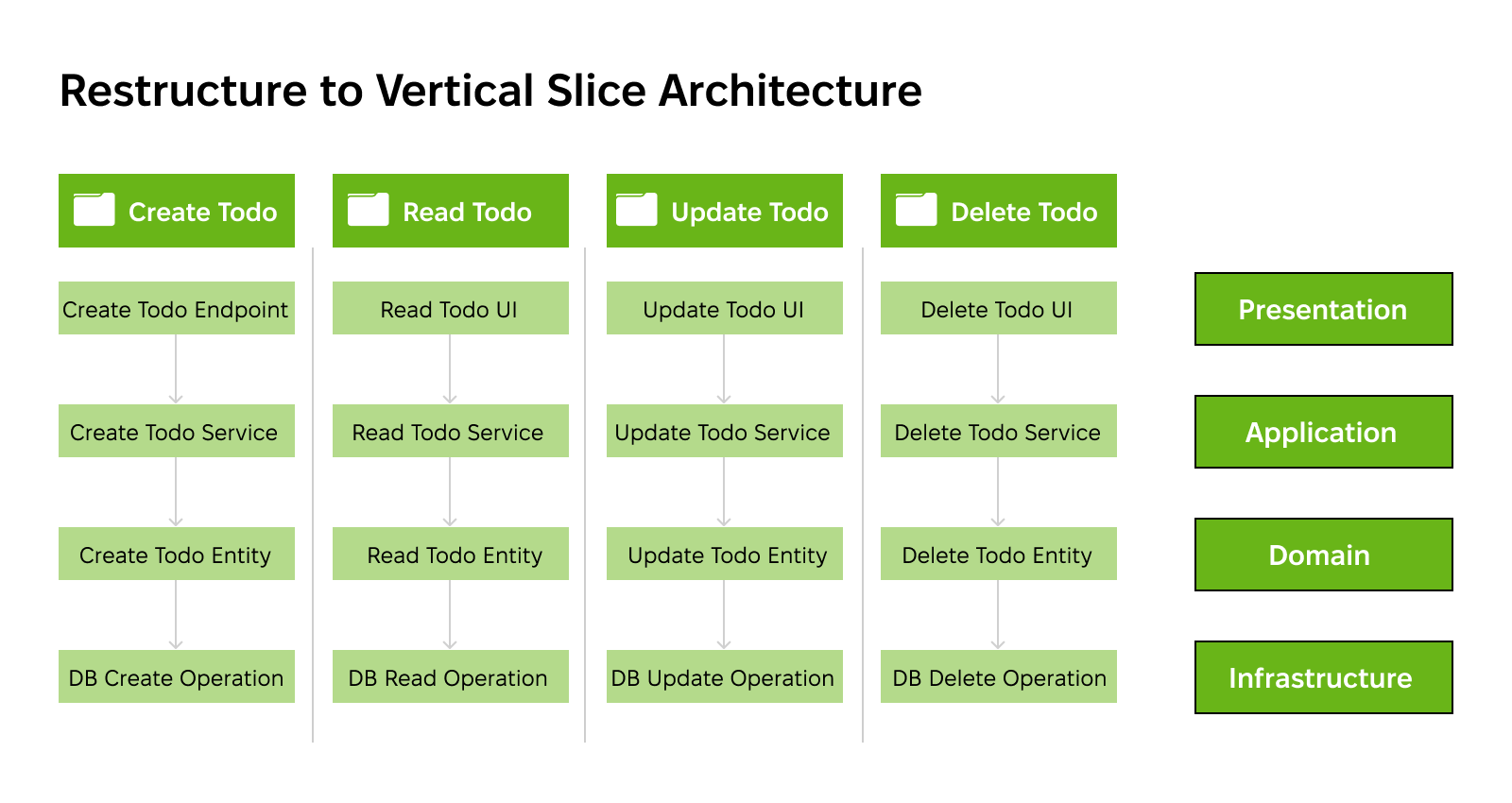 Source: Dotdev, An example of a vertical slice architecture
Exoft’s advice: Prepare for a longer timeline and more hands-on management. Incremental rewriting typically requires 6+ months to complete (depending on complexity), and strong coordination is a must.
An international media company owner and operator turned to Exoft to modernize a marketing campaign management tool built on .NET Framework 4.8. When providing legacy application modernization services, Exoft’s team had to balance preserving critical features with introducing new technologies. Within a year, Exoft:
Within less than a year, the company saw faster load times, fewer bugs and lower error rates, better responsiveness. There was an improved scalability across a platform serving over 1 million readers in 17 countries.
Strategic rebuilding involves starting fresh and building a new system from scratch using a modern architecture and tech stack. It’s the most time-consuming, expensive, and riskiest approach on the list. Still, it’s the best solution in rare cases when the system is too outdated to salvage incrementally.
This path works best for companies that can afford a full rewrite and only if the cost of carrying existing tech debt exceeds the cost of a full rebuild. In our experience, a full rebuild is rarely the right call. Most assessments and solution audits lead us toward incremental rewriting or a tech stack upgrade instead.
✅ What changes:
❌ What stays intact:
Exoft’s pro tip: Opt for this approach only if preserving legacy business logic would cost more than rebuilding the system. Do not choose it if there’s no real business need for a rebuild and you simply want a more modern tech stack.
«Every client who comes to us asking for a full rebuild has the same fear: what happens to the business while we’re rebuilding? Honestly, it’s a valid fear. A full rebuild takes months of work happening at the same time. The old system keeps running while the new one isn’t finished yet. That’s why we almost always advocate for incremental migration. This way, you’re not risking all your money and efforts on one launch day.»
Not sure how to migrate from .NET Framework to .NET Core in your specific case? Here are the six questions to consider before selecting the migration path:
The approach you pick will determine the project’s scope, costs, and timeline. That said, most .NET Framework migration projects unfold in five phases.
First, you need to know what you’re dealing with, and that calls for a system audit. During it, developers assess third-party dependencies, windows-specific APIs, integration points, and test coverage.
.NET Upgrade Assistant has been the go-to tool for automating the initial discovery. However, the tool has been deprecated and replaced with an AI-powered GitHub Copilot modernization agent:
| Criteria | Legacy Upgrade Assistant | GitHub Copilot App |
|---|---|---|
| Cost | No charge | Paid Copilot subscription required |
| Strategy | Deterministic, rule-driven | Adaptive, AI-driven |
| Predictability | Consistent (identical inputs yield identical outputs) | Inconsistent (AI may produce varying solutions) |
| Ease of use | Step-by-step wizard UI | Conversational chat interface |
| Git integration | Commits handled manually | Each change triggers an automatic commit |
| Availability | Accessible via CLI or hidden settings | Built-in default starting VS 2026+ |
| Maintenance status | No longer actively developed (maintenance mode) | Under active development |
Source of the table: GAP Velocity, Legacy .NET Upgrade Assistant vs GitHub Copilot modernization agent: Comparison table
A thorough audit of dependencies early on can save you time and money down the road, as the team behind the Microsoft Commerce migration can attest. Before touching a single line of code, treat this like an IT rationalization exercise: make inventory of your apps and assess their value first.
Your application may rely on .NET Framework components that don’t have a cut-and-dried alternative in .NET. Those hard dependencies can block the migration. They include:
Full rebuilds are rare and in most cases, you’ll start small and iterate. Here’s what it means depending on the approach:
Subject the updated codebase to a battery of tests, including:
Important: Run both versions of the system in parallel for some time before cutting over to catch issues and compare performance in production.
Unlike the .NET Framework, .NET offers multiple deployment options:
Your choices here will impact your long-term infrastructure costs, application performance, and maintainability.
Before you start racking your brain over how to migrate from .NET Framework to .NET 10, you’ll have to decide who will take care of the migration. Will it be your in-house team? An external partner? Both?
Each approach has its pros and cons:
| Migration ownership | Pros | Cons | Best for |
|---|---|---|---|
| Internal |
|
|
|
| External |
|
|
|
| Hybrid | Combines the pros of both approaches |
|
|
Besides securing the expertise required, you will need to secure stakeholders’ approval and resources and retrieve all the app documentation you can find. If you partner up with an external vendor, knowledge transfer is non-negotiable. It goes both ways:
Exoft will provide workshops and documentation to bring your team up to speed.
Legacy .NET application modernization is by no means a straightforward, one-size-fits-all process. Your system’s complexity, dependencies, and tech debt will dictate which approach is the best in your specific case. So, audit the codebase before making a decision.
Need a hand selecting the right approach and executing it? Exoft has been helping companies identify the most effective migration path and leave legacy technology behind with minimal risks. Discover what we can do for your .NET Framework application.
It’s better to migrate straight to .NET 10 since .NET 8 will reach its end of support in November 2026. The same goes for .NET 9. Besides, .NET 10 offers some advantages over .NET 8, such as better runtime performance.
Designed to be natively cross-platform, .NET doesn’t support server-side WCF and Web Forms, as well as some other Windows-only dependencies. You’ll have to switch them out for modern alternatives (gRPC and REST APIs for WCF; Blazor or Razor Pages for Web Forms).
Migrating from .NET Framework to .NET entails risks like downtime, unexpected system behavior (e.g., authentication breaks), silent failures, delays, and cost overruns.
Use metrics like response time, throughput, error rates, storage costs, compatibility issue count, and rollback incidents to measure migration results.
The answer depends on your in-house expertise in .NET Framework and .NET, as well as migration complexity and the resources you can allocate. That said, external partners have more experience with .NET migration projects, which helps mitigate risks.