Need a hand separating business-critical features from bells and whistles?
We can take a deep dive into your operational problems to define the most effective capabilities.

Published: 9 June, 2026 · 8 mins read
Your property maintenance software should fit your workflows like a glove and solve the operational problems you’re struggling with. Otherwise, it’s just a waste of money. In this guide, we’ll walk through the must‑have features in property maintenance software (and when custom development makes sense) so you can avoid overpaying for generic field service tools.
Your business exists to handle all the intricacies of property maintenance for owners. But one misstep, one delayed repair, one messy report can cost you their trust.
But that’s not the only way operational problems can spell trouble for you. Forgot to schedule an inspection and missed the deadline? Prepare to face the ire of regulators. Can’t quickly find records? Congratulations: you’re paying for hours of work that later get wasted on following the breadcrumbs across emails, text messages, and folders.
Add grappling with rising operational costs to the mix, and you probably realize one thing: solving those operational problems is no longer optional.
That’s where property maintenance software comes in. It can automate routine tasks and ensure you’ll never lose a record. Read on to discover:
We can take a deep dive into your operational problems to define the most effective capabilities.
Let’s be clear: there’s no such thing as one-size-fits-all property maintenance and management software. An inspection firm with a team of 10 won’t need predictive maintenance; it should prioritize features such as recurring scheduling and prebuilt report templates. However, a company with 500+ units in its portfolio could greatly benefit from predictive maintenance.
So, how do you define the right features for your particular case? In our experience, it all starts with understanding which operational problems you’re trying to fix (and how software can help you resolve them.)
Let’s take a deep dive into the five most common operational challenges property maintenance companies face.
What the problem looks like: You have no idea where your technicians are, how many are available right now, or how every job goes until they report. You find out about issues like skipped visits, delays, or unsatisfactory results only when you get a call from a frustrated client.
Why it matters: The older the housing stock, the higher your maintenance workload. As it increases, so does the price for those inefficiencies in the field. For the record, the median age of renter-occupied housing units totaled 45 years in the U.S. in 2023 (the latest data available), and maintaining homes built in the previous century costs 76% more.
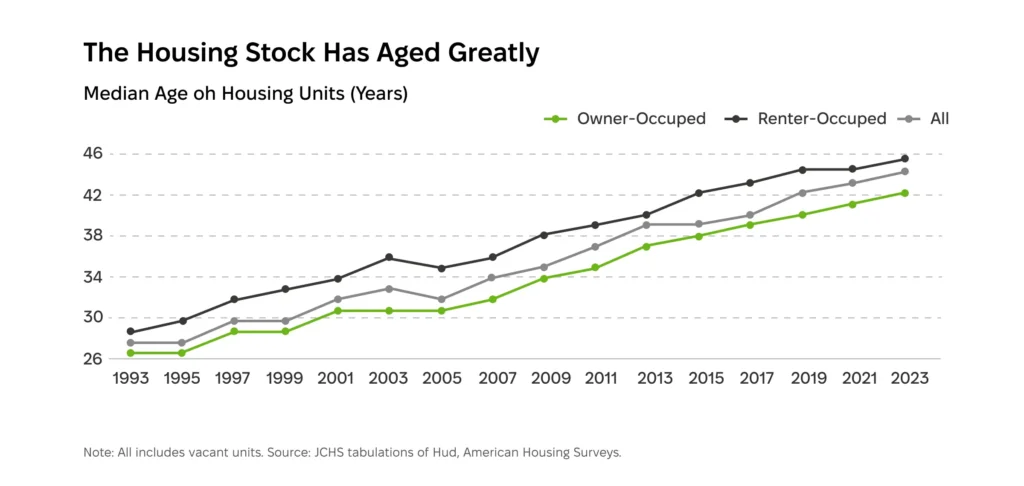
How software solves it: Real-time job and technician views within the work order management software give you full visibility into job status and technician availability. So, no need to call the technician to get a status update or assign a new job. The field service software for property maintenance also keeps clients in the loop when a technician is en route or late, preventing calls or complaints.
Features to consider:
«Maintaining homes built before 1980 costs 76% more than post‑2010 homes, which magnifies the cost of inefficiencies in the field.»
What the problem looks like: One of your clients asks you when the sprinkler system was last tested. You spend precious minutes hopping from email search to the file explorer to spreadsheets to provide an answer. The situation repeats itself whenever you get questions about the asset and property history from clients, renters, insurers, or regulators. Or whenever property managers need to publish a listing on a dedicated portal.
Why it matters: Spending time looking for information quickly adds up to an estimated 3.6 hours a week. That’s the 3.6 hours you could’ve spent communicating with clients or handling tenant requests. Besides, when asset history is hard to find, technicians may lack crucial context to fix or maintain it. So, they might need to spend more time on it — or even leave to grab the right tools for the job — increasing your operational costs as a result.
How software solves it: Thanks to centralized storage, technicians can quickly access every asset’s complete history by scanning a QR code or NFC tag on the spot. The maintenance tracking software supplies the right checklist to document the job, and that information is automatically added to the asset’s history. You can easily retrieve any property’s or asset’s history within the facility maintenance software; so, no more wasting hours a week searching.
Features to consider:
Case study: We developed a maintenance management platform for senior living residences that keeps work orders, inspections, contractor tasks, and maintenance records in one system. Facility teams can see what was done, who handled it, and whether the work passed inspection without piecing the history together manually.
«Many safety-critical building systems (fire alarms, lifts, emergency lighting, gas safety, boilers, etc.) are inspected quarterly, every six months, or annually, with some checks as often as monthly. For example, emergency lighting is tested monthly plus a full three‑hour test annually; fire alarms are serviced quarterly; boiler servicing is annual. These historical records should be captured, preserved, and used as a reference for every inspection.»
What the problem looks like: Every time you have to procure documentation for local, state, or federal regulators or insurance companies, it’s a gargantuan task. You have to hunt down scattered traces of inspections (and sustainability reports for green real estate). You might also be horrified to find out that you’d missed a mandatory smoke detector or gas check.
Why it matters: It’s not enough to just do the inspecting and maintaining to comply with the “warranty of habitability” legal requirements. You also have to prove it. Fail to do so, and you may be found liable for a safety accident or fined for a code violation. (In New York City, those fines can go as high as $25,000 per day.) Failure to comply will also alienate clients, hurting your retention and, therefore, revenue.
How software solves it: Building maintenance software creates a full audit trail for every job: who did what, where, and when, complete with photo evidence — no need for manual entry. The inspection management software can generate reports in appropriate formats for regulators and insurers regularly or on demand. Automated inspection scheduling, in turn, prevents accidental code violations.
Features to consider:
«Distance (63%), resident management (61%), and maintenance (56%) are the leading reasons rental owners hire property managers. Compliance is another major concern, with 33% of owners citing regulations as a primary factor in their decision.»
What the problem looks like: It takes you half a day to assemble every owner report. First, you bring together job sheets, warranty claims, and portfolio performance data from different systems and communication channels. Next, you painstakingly pull all the invoices out of the ERP system or, worse, an assortment of emails. Rinse and repeat every month, for every owner.
Why it matters: Manually creating reports for just 10 owners means wasting 5 days’ worth of pay. Delays, stale data, and outright errors, in turn, bring down the quality of communication, which is the leading factor owners use to assess the performance of their property managers. Besides, how could you possibly accommodate different update frequency preferences if every report has to be assembled manually?

How software solves it: Property maintenance and management software uses customizable templates to generate reports regularly (e.g., monthly, weekly, or quarterly) or on demand. That saves you hours of work. Besides, owner and client portals can display real-time portfolio data. With it, owners don’t have to wait for their report or contact you to see the latest updates.
Features to consider:
What the problem looks like: The moment something breaks, a renter or facility manager does what they’re supposed to: notifies you by email or phone (provided you’re responsible for fixing it, of course). And then… nothing happens. They don’t hear from you for hours, even if the issue is serious. They feel like they’re left hanging.
Why it matters: First, processing emails and answering calls takes time, plain and simple. That’s an additional strain on your resources. Plus, it slows down response and resolution times, too. Lack of immediate status updates also leaves renters and staff in a state of uncertainty. Removing that uncertainty matters more for customer satisfaction than services meant to “delight” them.
How software solves it: Renters and property staff can submit requests, along with photos and notes for context, using their preferred self-service channel; no emailing or calling necessary. Once they submit their request, they get a clear breakdown of the next steps in the process, along with alerts for any status updates. That means no uncertainty for renters or staff, faster maintenance thanks to the provided context, and visibility into requests for property owners.
Here are the most popular mobile app features among renters, 2025:

Features to consider:
As we’ve covered in our property management software development guide, defining your functional and non-functional requirements is always step number one. That said, we know it can be hard to separate the must-have capabilities from the extras your business doesn’t really need right now.
Based on our experience with home maintenance app development, these five features are essential:
| Feature | Description | Business Impact |
| Offline‑first mobile app | A mobile app for technicians that enables them to update job status, follow checklists, and attach photos and notes. All of its features work offline, syncing data once the app is back online. | Allows technicians to provide field visibility while working in low- or no-connectivity areas: rural sites, basements, etc. |
| Asset‑level history | Users can view the full servicing history for each asset on its dedicated page. | Speeds up information retrieval: users don’t have to go through all the records to locate the ones concerning a specific asset. |
| Configurable recurring schedules | Recurring visits and jobs are automatically scheduled using standard (annual, biannual, quarterly) or custom intervals. | Mitigates the risk of missed inspections; allows following both regulatory and manufacturer guidelines. |
| Audit trail integrity | No one can edit records after submission without leaving a trace. | Preserves the accuracy and reliability of every record. |
| Role‑based access | Users have access only to the data they need: technicians see their jobs, clients see their properties, and admins see everything. | Ensures compliance with data privacy regulations; mitigates security risks. |
These three features, in turn, are useful only in very specific cases. Chances are, you don’t need them YET if you’re operating with a small team.
| Feature | Description | You don’t need it if |
| AI‑powered predictive analytics | An algorithm that uses historical and real-time asset condition data to detect early signs of issues and forecast when maintenance is necessary. | You’re a small team still struggling with basic job visibility. |
| Marketplace module | A client-facing platform that connects homeowners in need of property maintenance with contractors | You’re not running a two‑sided platform yet. |
| CRM module | A comprehensive suite of features for client relationship management that you can access without leaving the software | You already have a CRM or you’re a small business that doesn’t need one at all. |
Good property maintenance software doesn’t need to have the most cutting-edge features to be a real asset that cuts down your operational costs and improves client satisfaction. What matters is how well it fits your field workflows and meets your documentation and reporting needs, not how fancy its features are.
To ensure your property maintenance software meets those needs, define and analyze your operational problems before thinking about the capabilities you want. Every capability should address a specific problem, be it manual reporting, lack of field visibility, or scattered compliance documentation.
Exoft will help you find the most suitable solution for each of them — without overengineering.
Generic field service tools are built to appeal to businesses across industries, from self-employed plumbers and electricians to telecom companies. Unlike them, property maintenance software can support domain-specific workflows (e.g., tenant requests, owner and client reports).
Yes, but the complexity of integration depends on the accounting system you’re using. Modern solutions can be integrated via APIs, but legacy systems may require using middleware or an IPaaS solution.
QR codes and NFC tags serve as the unique identifiers for each asset and enable access to information about it. A field technician uses a mobile app to scan the code or tag. Once they do, the mobile app displays the asset’s full servicing history, technical characteristics, and, if necessary, the inspection checklist.
Custom software makes more sense if your workflows and business needs are too complex or unique for vendor solutions. Going the custom development route also gives you full control over the tool’s features, both initially and in the long run.